viernes, 27 de octubre de 2017
This is my CPD project
This is the project I created for Teens 5 to work on vocabulary related to teenagers.

domingo, 22 de octubre de 2017
My Storyboardthat
This is my Storyboardthat. I created to help my Teens 2 pupils practise the present simple in a different way. They will look at the captions and read them but they will also add more sentences to each of them. They could also ask and answer questions in pairs taking the pictures as prompts. Then, they can retell the story using the third person singular. Finally, they can write a paragraph about their own personal routines.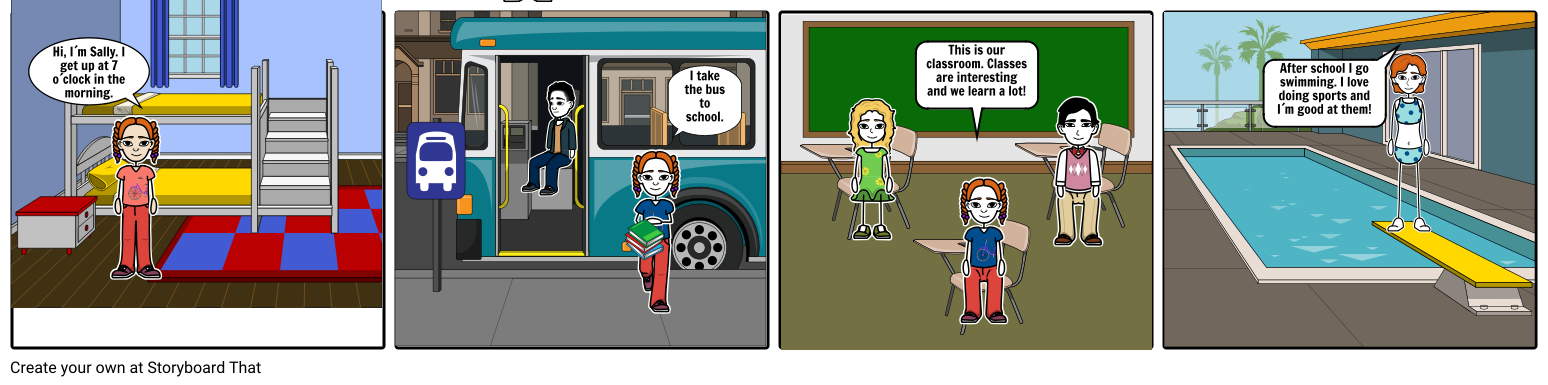
Made with Storyboard That
Made with Storyboard That
My Google Drawing
I created this Google Drawing for my Pre First class. They had dealt with different relationships and I thought it would be a good idea to show them in different photos. First, they would talk about the photos in pairs and then, by clicking on each photo they would have access to more inormation about each of them. I tried to integrate the different skills by including a listening, an article for them to read, a video. etc.

My Voicethread
I used Voicethread with my Adults 4 class. They were dealing with a topic related to the cinema and its history so I asked them to listen while watching the slides. They did it in groups just seeing part of it and then, in pairs, they told each other what they had been informed about. Later, they watched the whole presentation and talked about their favpurite films and directors.They interviewed each other imagining they had lived in different times of the history of the cinema.Finally, they wrote a letter to a friend inviting them to see a film stating the reason for their choice.
My padlet
This is my padlet. I used it with my teens 2 class. They had seen celebrations in the coursebook so I thought it would be a good idea to make them search for information about festivals and celebrations around the world and share it with the rest of the class. They really enjoyed it because while they were working they could see their classmates' productions.

viernes, 13 de octubre de 2017
These are my Google slides
I created these google slides to motivate my First Certificate students to talk about technology in a different way. They would work in pairs and talk in turns for a minute about the slides presented. In this way they would have to be ready to talk about different aspects of technology and at the same time, they would get used to timing themselves.
This is my Google Drawing
I would use this Google drawing with my Teens 2 group. They would revise comparative adjectives by comparing the pictures. They would work in pairs using long and short adjectives.

viernes, 6 de octubre de 2017
The next tool I used was Google Forms. I used this tool in my Teens 2 class. I think this is an interesting way to make them revise the past simple tense. It presents short and long answers as well as multiple choice options.They received the form by email and after filling it in they shared their answers in pairs in class.

Suscribirse a:
Entradas (Atom)